For Anthropic · November 5, 2026

Getting people to use Claude well

What adoption looks like in a large consulting practice, and what’s helping people get there.

Glenn Trepeta

With you today

Glenn Trepeta

glenn.trepeta@pwc.comlinkedin.com/in/glenntrepeta

M&A and enterprise transformation consultant by background. For the last two years, in a role dedicated full time to AI.

A front-row seat to enterprise AI adoption at scale, building and scaling it inside a large firm.

My practice is the first at the firm to roll Cowork out to every practitioner, with a dedicated rollout. Elsewhere, people can request access, but it isn’t pushed to them.

  1. Early ChatGPT
  2. Coding agents
  3. Cloud-hosted agents
Favorite Claude toolManaged Agents
Fun factBought a house this year with Claude Code
In one lineClaude has changed my life

Part 1

The adoption gap

Claude can do far more than most people ever ask of it.

The adoption gap · How the tools arrived

How AI tools arrived at the firm

2024–25

Chatbots

e.g. ChatGPT, Copilot, Claude chat

How you work
Ask a question, get an answer
What it sees
Whatever you paste in
What it asks of you
Nothing to set up first

May 2026

Coding agents

e.g. VS Code with GitHub Copilot; Claude Code by request

How you work
Point it at a folder and give it a task
What it sees
Every file in the folder you pick
What it asks of you
Pick the folder, learn CLAUDE.md and skills, and get past a black editor screen

October 2026

Claude Cowork

The same idea in a friendlier app

How you work
Point it at a folder and give it a task, in a desktop app
What it sees
Every file in the folder you pick
What it asks of you
Pick the folder. Setup helps, but you can start without it

The adoption gap · Rolled out like software

AI has to be built up like a capability, not rolled out like a tool

The capability lives in people’s habits, not in their access.

The adoption gap · How people use it today

Most people still work with AI the way they worked with chat

  1. 1

    Shallow use

    They take a first draft from AI, then do the rest by hand.

  2. 2

    Habits built around chat

    One chat per question, no folder, and nothing carried over to the next one.

  3. 3

    A chatbot in their heads

    They picture something that answers questions, not an agent that works in their files.

The adoption gap · It keeps moving

AI keeps changing faster than people can keep up

Just as people got comfortable with chatbots, the ground moved. Each new idea builds on the last, and most people are still on the first two.

Where most people got comfortableWhat arrived since

  1. ChatbotsAsk a question, get an answer
  2. Custom GPTsSaved instructions for one task
  3. Coding agentsIt reads and writes your files
  4. CLAUDE.md and skillsInstructions it reads before every task
  5. Scheduled tasksWork that runs on its own
  6. ArtifactsLive pages and tools you can share
  7. Managed agents and DuetAgents that run in the cloud, and a Claude you message like a person

What I hear most“I don’t have time to keep up.”

Nobody needs all of it. People need the next step from where they are, and training that keeps going after the rollout.

Part 2

Where people are with AI

By how they use it, and by role. Each group gets stuck for a different reason.

Where people are · By how they use AI

Five kinds of AI users

1

Non-users

2

Irregular users

3

First-draft users

4

Everyday users

The target
5

AI-native users

How much of their work runs through AI →
Who they are
Some resist change. Others tried an early ChatGPT, saw it hallucinate, and wrote it off.
They use it now and then, for emails and Google-style questions.
They use it most days, but only for the first pass: draft the email, draft the deck.
They’ve realized they can use it across the whole job, not just one task: the slides, the analysis, the drafts.
AI enthusiasts who experiment, try new things and think like builders. They’ve found a way to 10x themselves, or more.
What holds them back
They don’t know how far the models have come.
One weak first draft of a deck and they stop, when a follow-up would have fixed it.
They take the draft back and finish it by hand, moving boxes around in PowerPoint, instead of asking for the next pass.
They skip CLAUDE.md and workspace setup. They leave value on the table, but they get real work done.
Not much. Many work in Claude Code with their own CLAUDE.md, skills, hooks and subagents. Some build on Claude Managed Agents.
What it looks like
Slides and data still done by hand.
AI as a search box, opened now and then.
AI as a starting point, never the whole job.
They just use it to do their work. The ideal knowledge worker.
Whole pieces of work handed to AI end to end, and their own skills and tools built along the way.

→ The goal for a large firm: move people from groups 1 to 3 into group 4.

Where people are · By role

Today, deep business knowledge and strong AI skill rarely sit in the same person

Knows the business →
Works well with AI →

More tenured staff

Know the business best and haven’t moved their work into AI.

Early-career staff

Used to asking AI questions, but most aren’t power users, and they’re still learning the business.

The broad middle

Sit in between and rarely use AI, or use it carelessly.

Where people sit today. Illustrative, not measured.

Where people are · Each role up close

Each group is held back by something different

More tenured staff

Longer at the firm, and know the business deepest

Where they get stuck

AI hasn’t clicked for them, and they don’t trust the output. They don’t yet see what sitting it out costs.

What’s changing

Competitors are moving and clients are asking about AI.

Early-career staff

Newer to the work, and many used ChatGPT all through college

Where they get stuck

Used to asking it questions, not handing it real work, and still learning the work itself.

What happens

Their output looks confident and carries errors they can’t spot.

The broad middle

The large group in between

Where they get stuck

Many don’t use it. Those who do haven’t yet built the judgment it takes.

What happens

One poor result, and they stop trying.

Where people are · The biggest mistake

Assume every practitioner starts from zero with AI

The biggest mistake is assuming people know something about AI. The real gap only shows when you get them talking or see their screen.

What we assumeWhat we find on their screen

  1. They know the basics of AIMany are still on their first impression, often an early chatbot.
  2. We mean the same thing by “project,” “access” or “sync”The same words mean different things to each person, until you see their screen.
  3. The people who used to be the technical experts are aheadMany of them have fallen behind too.
  4. If something isn’t explained, they’ll work it outIf nobody tells them, most won’t know it exists.

So spell out every step: where to click, what it’s called and why it matters.

Part 3

Where it breaks down

Most of what holds people back has nothing to do with the model.

Where it breaks down · The part you already know

Enterprise red tape adds friction, but it isn’t the main gap

What Claude can doWhat people at a large firm get

Work across your email, calendar and files in Microsoft 365

Not switched on

Open any folder you work in

Three approved folders only

Add skills and plugins as you need them

Each one waits on an approval process

Send it a task from your phone

Not switched on

Use new Claude features the day they’re released

Each one waits to be switched on

People judge the tool on the version they’re given. Switch every setting on and the gaps in habits and ways of working are still there.

Where it breaks down · Shared folders

A SharePoint folder is to knowledge workers what a GitHub repo is to developers

Developers in Claude Codethe GitHub repo

Knowledge workers in Coworkthe engagement folder

README and CLAUDE.md

CLAUDE.md, read first by everyone

The code itself

The working files: models, decks, memos

Docs and specs

Context: the deal, stakeholders, workplan

Commit history

Session logs, meeting notes and recaps

Everyone clones the same repo

Everyone syncs the same SharePoint folder

Why one shared folder per engagement

  • Every chat starts from the same engagement context, whoever opens it.
  • Work carries over between chats, teammates and workstreams.
  • People roll on and off, and the engagement stays in the folder, not in someone’s chat history.
  • Managers and partners review the same files the team and Claude work on.

The folder is the home base. Most people still work from one chat, or from a folder only they can see.

Where it breaks down · Team workspace plugin

A plugin that gives each engagement one shared workspace

The gap it fillsOut of the box, Cowork is built for one person: each person’s chats and memory stay on their own laptop, and nothing records what the team has done. Engagement teams keep asking for a shared workspace, so this plugin fills that gap.

What the plugin does

  1. Interviews youThe engagement, the team, the deliverables
  2. ResearchesThe company and the deal, through the connected tools (MCPs)
  3. Sets up the workspaceCLAUDE.md, rules and context files
  4. Logs every sessionEach chat anyone on the team runs in the folder

The team’s engagement folder

  • CLAUDE.mdread first, by everyone
  • context/deal, stakeholders, workplan
  • sessions/a running log of every chat
  • working drafts/what Claude makes

Is there a view where we can all see what everyone is doing in Claude?

What the team gets

  • One running record of every session
  • One picture of the engagement that every chat starts from
  • Visibility for the lead while the work is still happening

Even with the plugin, it’s only as good as the people using it

  1. Launch every session from the team’s folder
  2. Give Claude the context: who it’s for, what to use, what good looks like
  3. Go back and forth on the deliverable until it’s right
  4. Answer the setup interview in full: a thin answer becomes every teammate’s context

There are good and bad users of AI, and most people don’t know that yet. A count of sessions logged can’t tell them apart.

Where it breaks down · The workspace

Workspace ideas people haven’t grasped yet

Where it breaks down · Working habits

Working habits people haven’t built yet

Where it breaks down · Back and forth

No silver bullet: good output takes a few rounds of back and forth

There was no silver bullet before AI either. The same work just took longer.

The first prompt

Create a status deck for Friday.

A generic draft

What’s missing is context: who it’s for, what to use, what good looks like. It isn’t a limit of the model.

A few follow-ups

It’s for the CFO. Lead with the run-rate. Match last week’s deck.

Close

The same back and forth you’d have with a teammate who missed the meeting.

The output

Ready to send

Often better than the version built by hand

And in less time than doing it by hand.

Where most people stopAfter the first prompt, they decide they can do it faster themselves and go back to doing it by hand.

Where it breaks down · Back and forth

The first output isn’t the limit of what Claude can make

Most people take the first output as it comes. It often clicks when they ask for something they didn’t think it could do.

The first output

TSA Timeline OverviewKey milestones and decision pointsMonth 0CompleteTSA clockstartsMonth 2.5Current14% elapsedMonth 4UpcomingFirst quarterlyresultsMonth 7UpcomingFirst annualreportMonth 12CriticalLast momentto decideMonth 18EndTSA termendsKey considerationsSequencing dependenciesStakeholder alignmentResource constraintsNext stepsConfirm milestone ownersReview decision timelineSchedule follow-up review

Clean, correct and generic

The default look when nobody asks for more, and a sure sign no one iterated. Most people stop here.

One more prompt

Give me five versions of this slide, each a different way to show the dates. Make one a road with a sign I can click at each milestone.

What came back · five versions

SEQUENCING The date that governs us is not a TSA date Neither of the two dates that drive sequencing appears in the agreement. MONTH 0TSA clock starts MONTH 2.5You are here MONTH 4First quarterly results MONTH 7First annual report STOP MONTH 12Last moment to decide MONTH 18TSA ends Click a sign to see why the date matters. SEQUENCINGThe date that governs us is not a TSA dateNeither of the two dates that drive sequencing appears in the agreement.M0M3M6M9M12M15M18TSA termDecision windowDecide by month 12ReportingQ1 resultsAnnual reportTodayThe decision window closes six months before the TSA ends.SEQUENCINGThe date that governs us is not a TSA dateNeither of the two dates that drive sequencing appears in the agreement.M1M2M3TodayM4Q1 resultsM5M6M7AnnualreportM8M9M10M11M12DecideM13M14M15M16M17M18TSA endsGoneStill time to decideAfter the decision9.5 months left to decide. Months 13 to 18 come after the decision.SEQUENCINGThe date that governs us is not a TSA dateNeither of the two dates that drive sequencing appears in the agreement.MONTH 0CloseMONTH 2.5TodayMONTH 4Q1 resultsMONTH 7Annual reportMONTH 12Last stop to change courseMONTH 18TSA endsDecision lineTSA onlyMonth 12 is the last stop to change course.SEQUENCINGThe date that governs us is not a TSA dateNeither of the two dates that drive sequencing appears in the agreement.TSA clock18 months15.5 months of services leftDecision clock12 months9.5 months left to decideToday · month 2.5Two clocks are running, and the one that matters is shorter.

Five ways to show the same dates, from one prompt

Click a version to see it. On the road, click a sign.

Where it breaks down · Ways of working

The more the client shapes the work, the more it takes going back and forth with Claude

Standard work can be set up once. Work shaped by the client changes every time, so people have to stay hands-on and get comfortable iterating.

← Set inputs, a standard outputShaped by the client, meeting by meeting →

  1. Set it up once, let it runDiligence reportThe financials in, the standard analyses, the standard report out
  2. Set it up once, let it runWeekly status reportPulled from the tracker, in the same format every week
  3. Draft it, then refine itService schedulesA standard template, filled in with the client’s input
  4. Work it through, turn by turnIntegration planningBuilt up in workshops, and changed after each one
  5. Work it through, turn by turnOperating model designDifferent for every client, reshaped after every steering committee
What that means

Most consulting work sits on the right. The skill people need most is working it through with Claude, turn by turn, not handing it off in one prompt and deciding the tool is no good.

Where it breaks down · The Cowork screen

In Cowork, most people miss the click that picks their folder

Project or folder2Manual
  1. 1What people click. The + uploads copies into the chat.
  2. 2What they need. “Project or folder” sets the workspace, the folder Claude reads and writes. It doesn’t look like a button, so many never click it.

Why it causes so many problems

  1. Chatbots never needed a workspace

    In chat, a project grouped chats, held instructions and built up memory. Working out of the team’s real folder is a different idea, and it never carried over.

  2. Projects and folders look alike

    A project is a layer just for you. The folder holds the real files.

  3. The team’s workspace is the SharePoint folder

    Pick the synced engagement folder, and everyone works from the same files and the same CLAUDE.md.

Without a folder picked, Claude can’t see the team’s files, and most of what it can do stays out of reach.

Where it breaks down · Chasing the next tool

Chasing the next AI tool doesn’t close the adoption gap

Many people miss when AI was a chat box: ask a question, get an answer, nothing new to learn.

  1. A new tool shows a featureEmail and calendar, switched on from the first day
  2. People want to switchIt looks like the tool they’ve been missing
  3. The same habits come alongOne chat, no workspace, one-line prompts
  4. The same shallow resultsAnd the search for the next tool starts again

New tool,
same habits

What happened this month

A small Microsoft Copilot Cowork pilot has email and calendar switched on, and people asked why the firm isn’t using it instead.

Claude has the same Microsoft 365 connector. It isn’t switched on at the firm yet.

What carries over to any tool

  • Work from a folder set up for the task
  • Brief it like a teammate
  • Go back and forth until it’s right
  • Write down what should carry over

Part 4

Closing the gap

Meeting people where they are, and showing them what it can do.

Closing the gap · What sticks

The moments when AI clicks for people

Most people think too small. It clicks when they see what Claude can do out of the box, and outputs well beyond a plain slide.

“It can do that?”

“Oh, the folder is where it works.”

The most basic one. Once people see that Claude works from the folder they pick, setup, context and sharing start to make sense.

“You made that with Claude?”

Seeing a power user’s work, like the films and the Lookbook, opens it up. Their own day-to-day use rarely shows what’s possible, so they don’t think bigger.

“A deck can do that?”

They’re used to plain PowerPoint. An HTML deck or artifact with live demos, video and parts they can click gets them thinking past the basic slide.

“An agent answered before Glenn did.”

Impa replies in Teams with the likely fix and a one‑minute film.

“I don’t have to take the first draft.”

Once going back and forth is a habit, they ask for more: five versions of a slide to choose from, then build out the one they like.

“This is real for me now”

“A client asked how we’d use AI.”

In a proposal or a meeting, and there’s no good answer ready.

“We lost to a more AI‑native pitch.”

A competitor came in with AI built into how they would deliver the work.

Closing the gap · Work in progress

A few ways we’re closing the gap

Closing the gap · Example films

Short films that each teach one idea

Under four minutesOne idea each

Each film shows one idea step by step, in plain language, so anyone can use it right away.

Scheduled tasks · 3:05

Films

Closing the gap · A weekly show

DDV Cowork Fridays

New every FridayWeek 3October 306:57

A weekly show I make with one partner, among the firm’s most advanced AI users. Each episode takes one big, little idea: a small change in how you work with Claude that makes a big difference.

Episodes

Closing the gap · The Lookbook

The Lookbook: self-service help for Cowork

Explainers, podcasts, troubleshooting and discussions. People search for the error they’re seeing and get the film that fixes it.

Open the Lookbook
The Lookbook0:35

Closing the gap · Impa

Impa: a managed agent that answers Cowork questions

It lives in a Teams chat. For the Cowork rollout, it answers practitioners’ questions with the likely fix and a Lookbook film.

How it works for the Cowork rollout

  1. A question landsA practitioner messages about a Cowork problem
  2. Impa wakesRuns on Claude Managed Agents and checks for new messages every few minutes
  3. Checks the fixesMatches it to a fix in the Lookbook
  4. RepliesThe likely fix and the film, marked [IMPA] Or hands it to meIf it isn’t sure

People get unstuck without waiting on me

Every question shows which film to make next

One template, many Impas

The Impa templateBuilt on Claude Managed Agents. A short setup interview gives each one its own instructions, sources and chat
Cowork rolloutThis one Engagement PMOs Go-to-market teams
Each one keeps its own memoryWhat it has answered, the fixes it learned from my replies, its working theories, and where it left off. It picks up from there on every run.

Q&A

Questions

Thank you for the time. Feel free to reach out anytime.

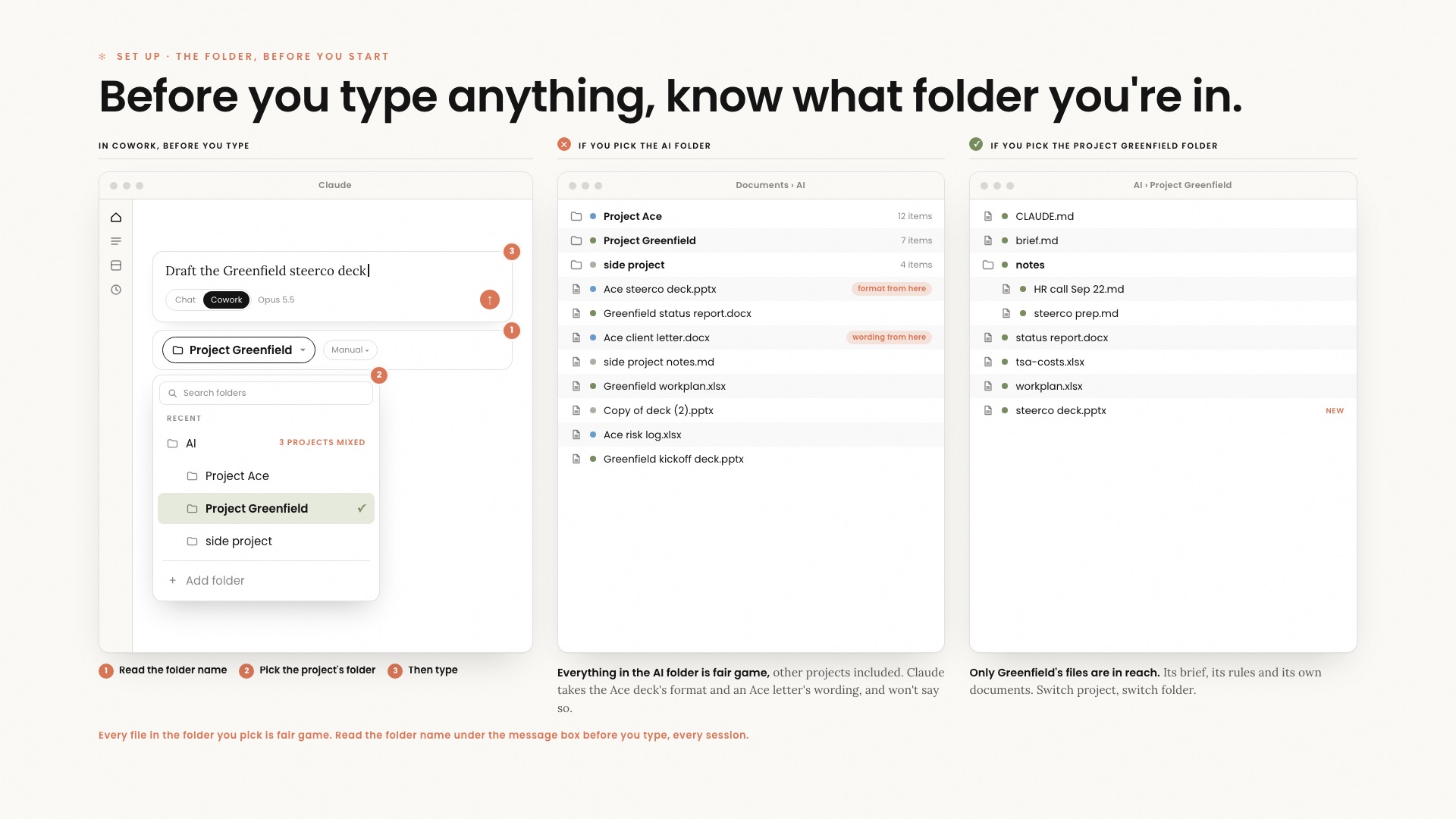
Training slide. Before you type anything, know what folder you’re in: the Cowork folder picker, a mixed AI folder, and a single project folder side by side.
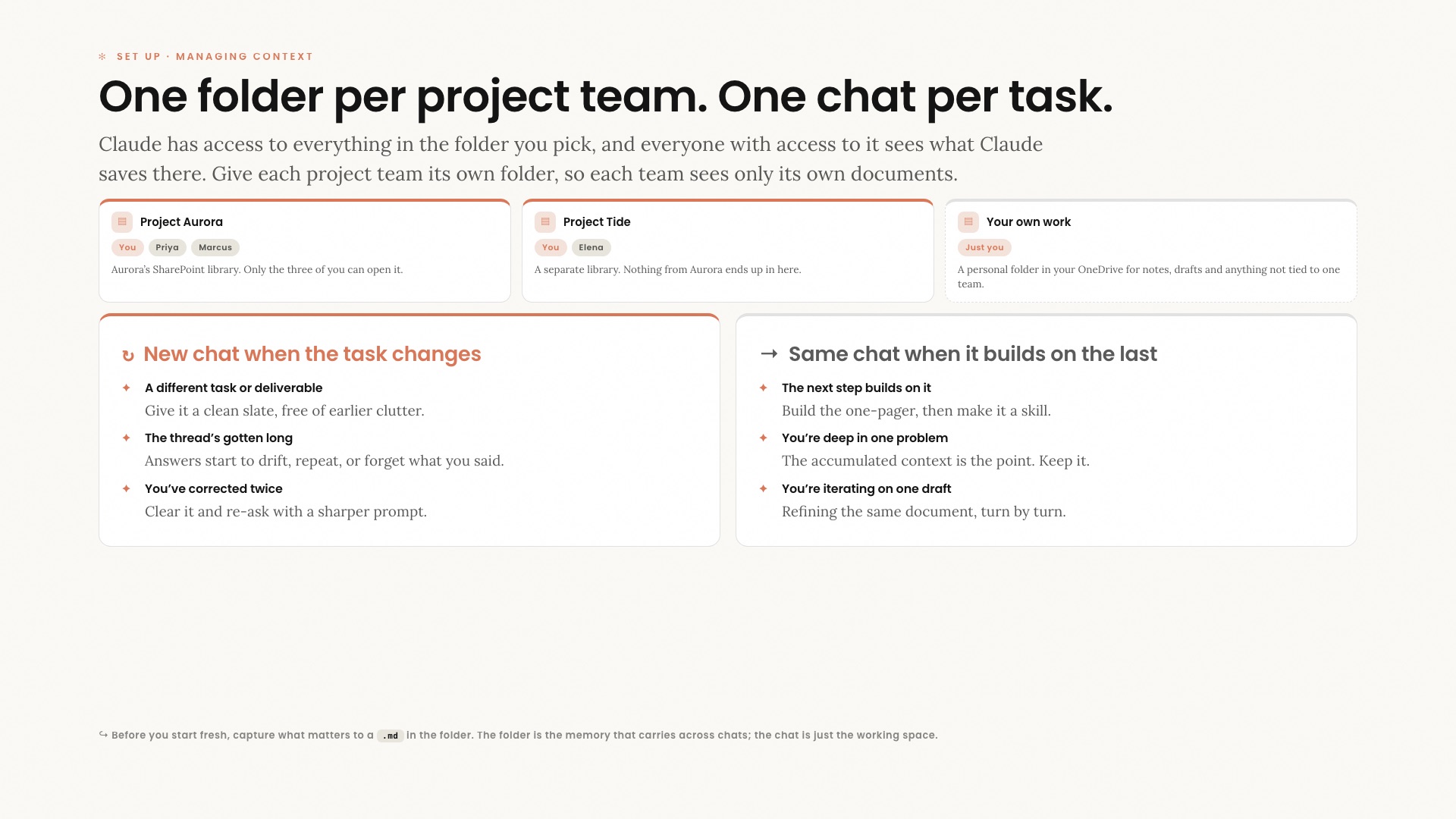
Training slide. One folder per project team, one chat per task: separate folders for each project team, and when to start a new chat or keep the same one.
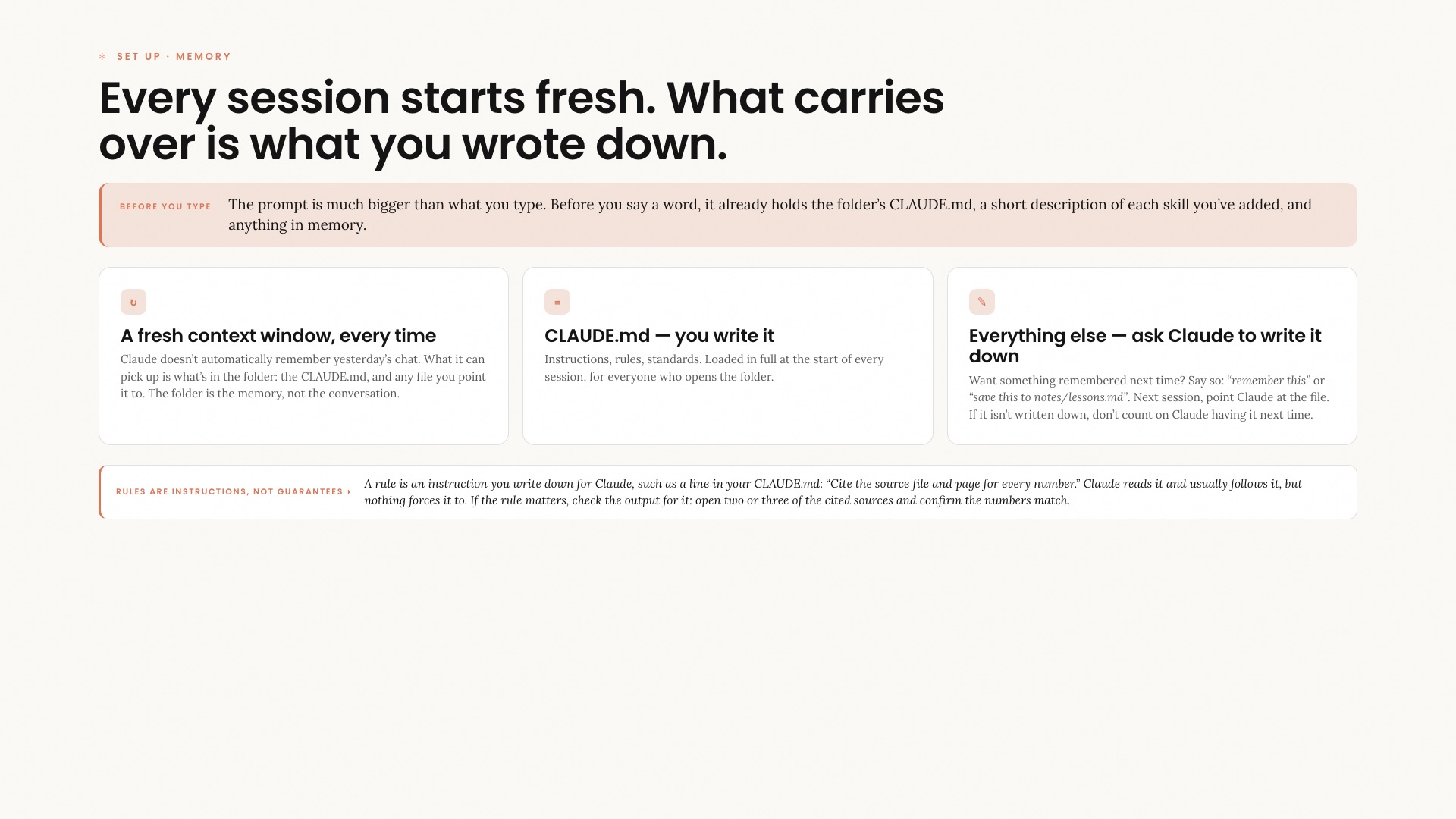
Training slide. Every session starts fresh, and what carries over is what you wrote down: a fresh context window, CLAUDE.md, and asking Claude to write things down.
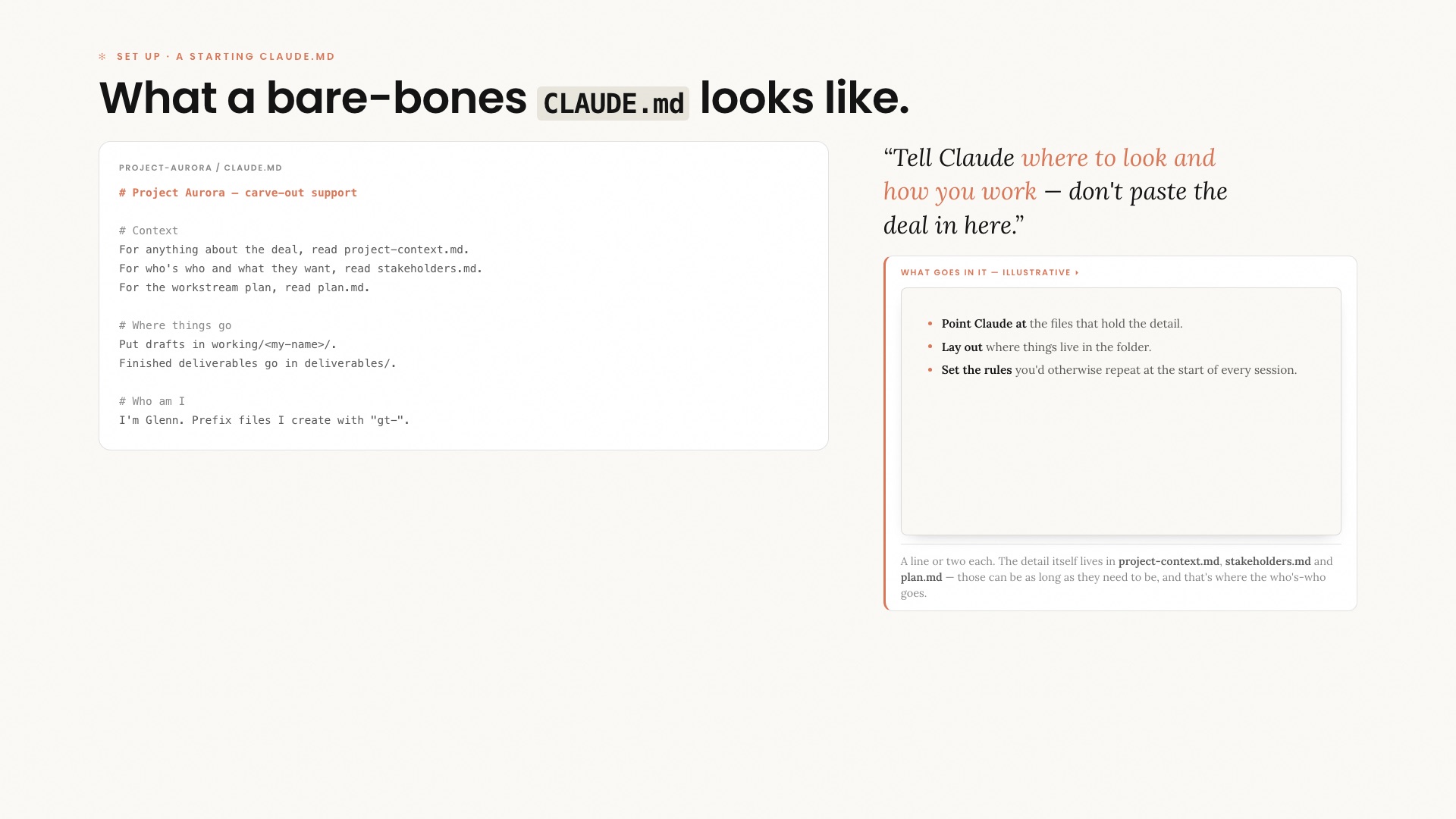
Training slide. What a bare-bones CLAUDE.md looks like: a short file that points Claude to the context files and says where things go.
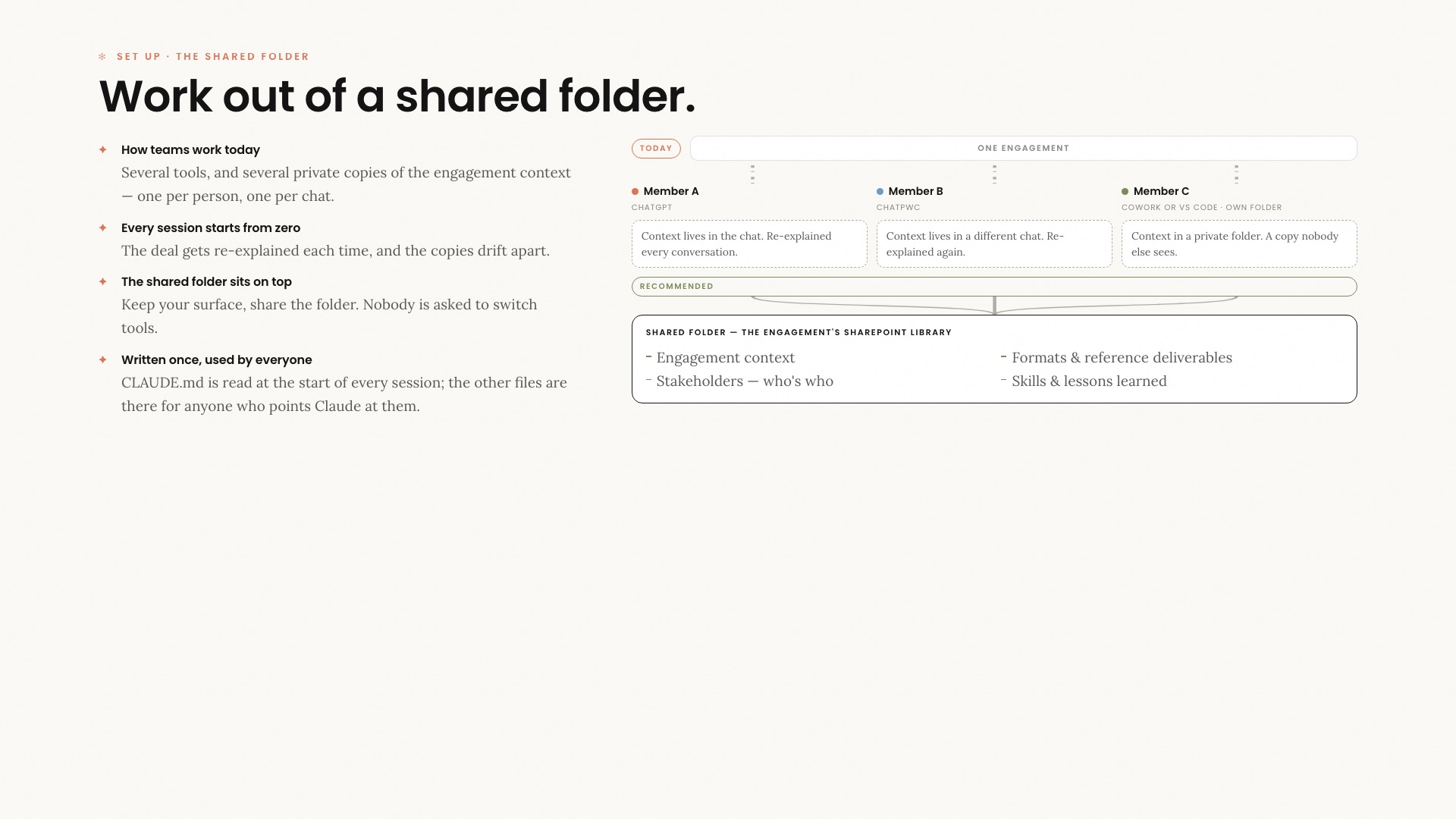
Training slide. Work out of a shared folder: today each person keeps a private copy of the engagement context in their own tool; the recommended setup is one shared folder with the context, stakeholders, formats and lessons learned.
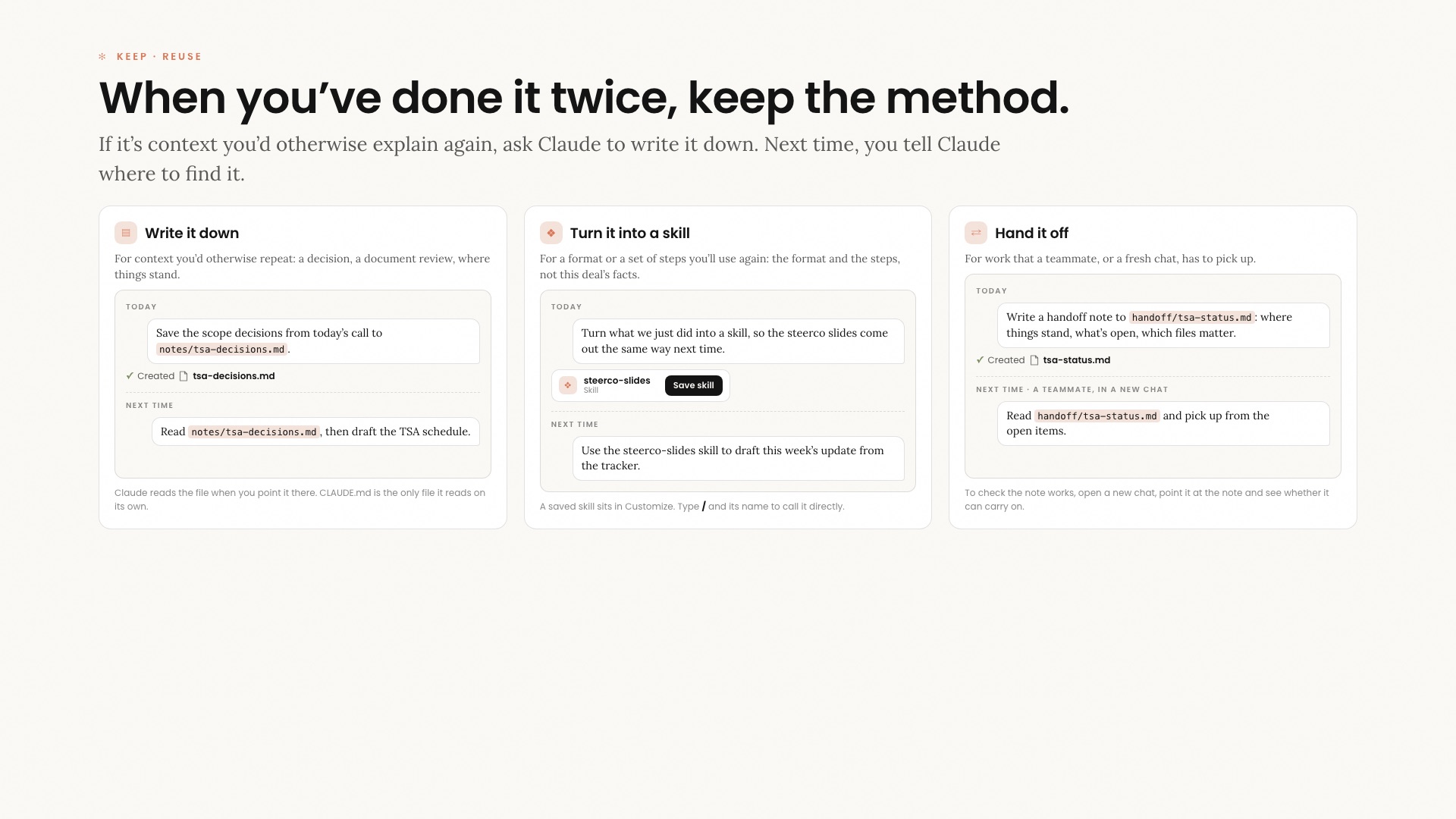
Training slide. When you’ve done it twice, keep the method: write it down, turn it into a skill, and hand it off with a note a teammate or a new chat can pick up.
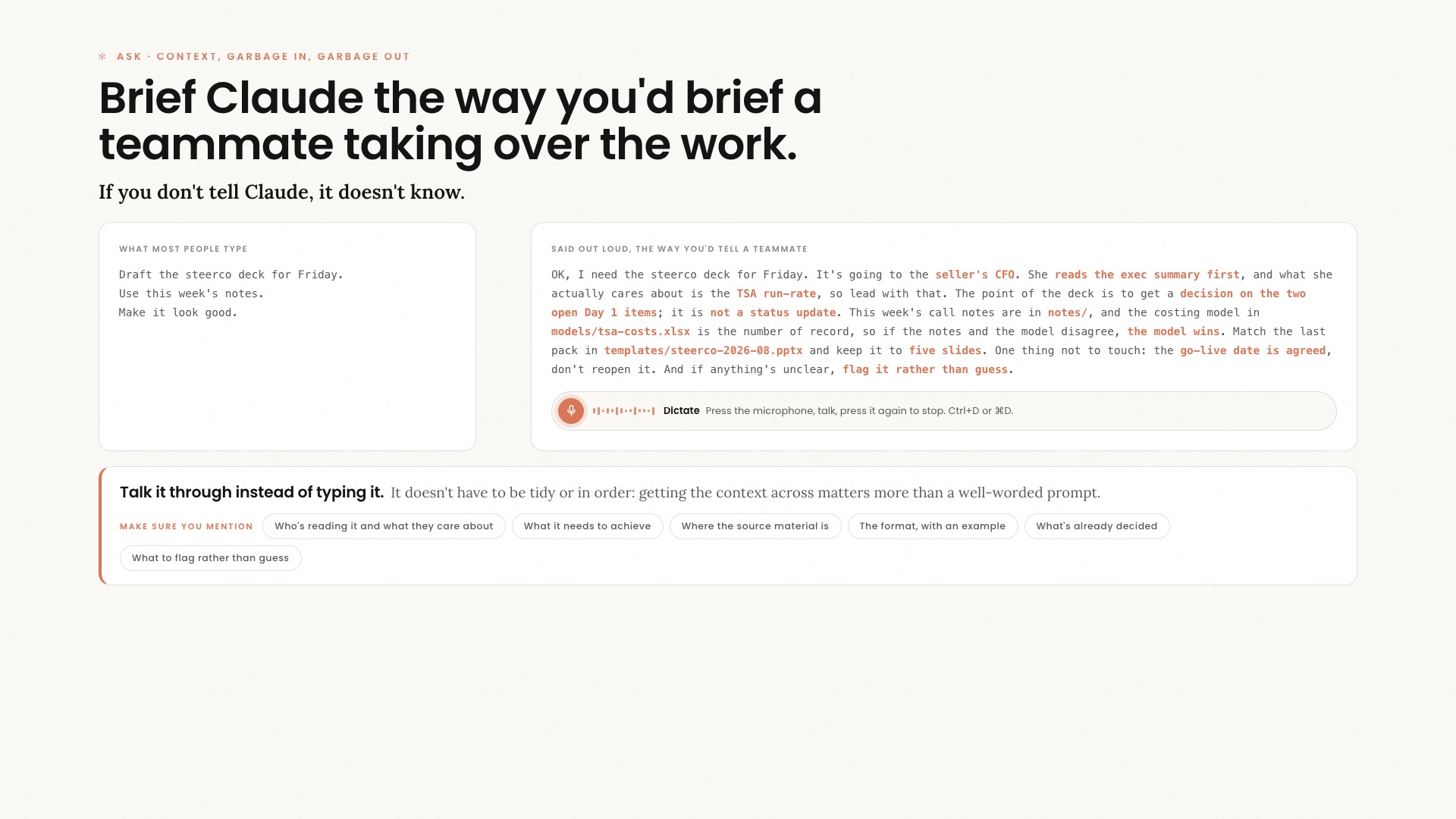
Training slide. Brief Claude the way you’d brief a teammate taking over the work.
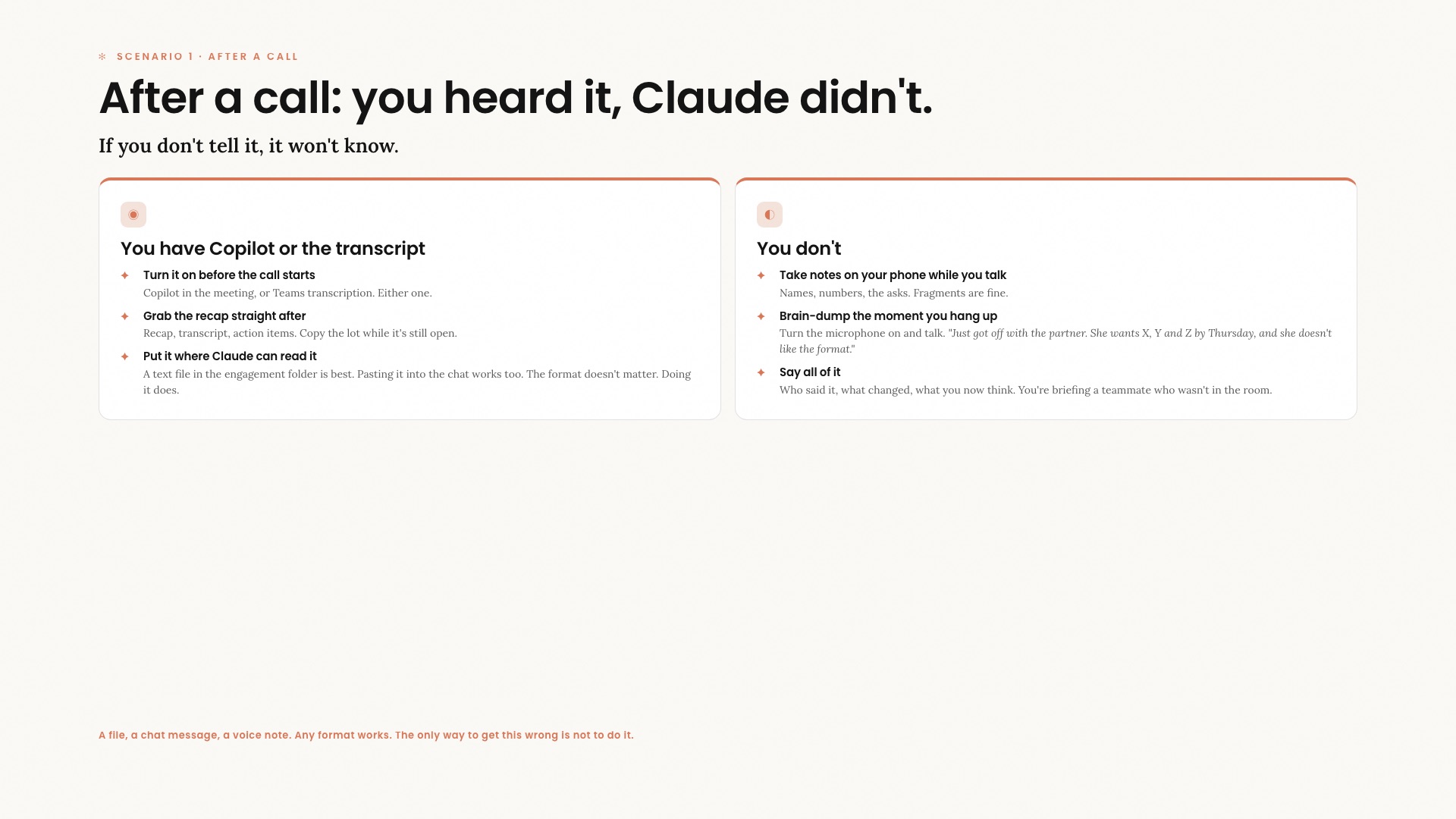
Training slide. After a call: you heard it, Claude didn’t. What to do with or without a transcript.
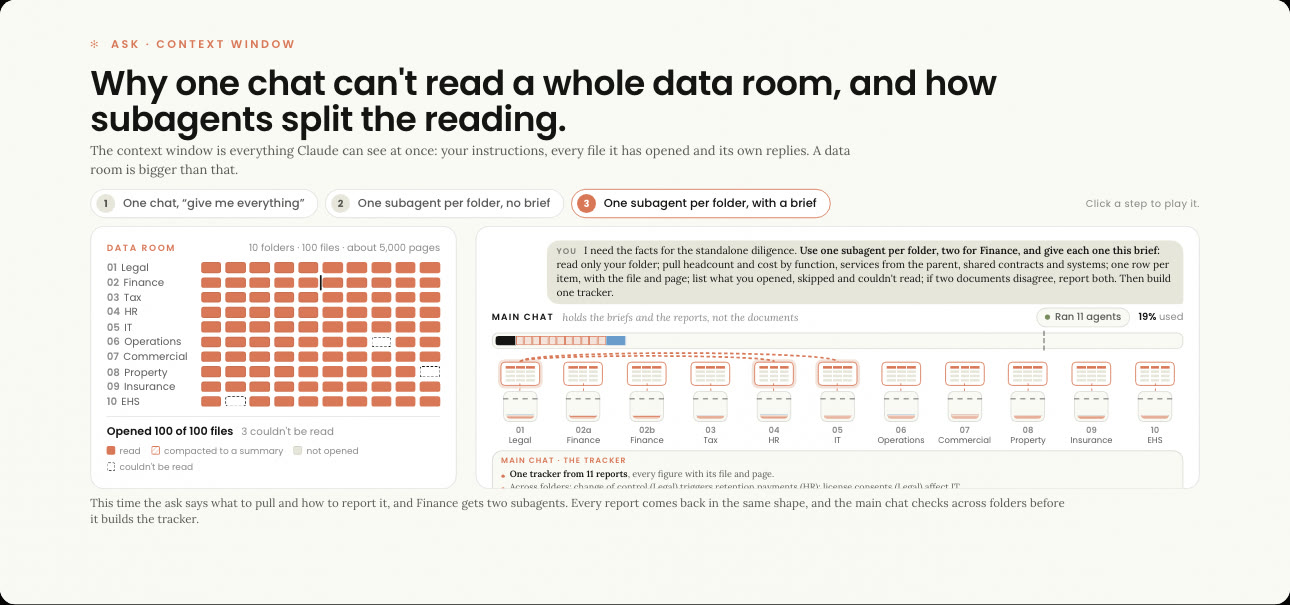
Training slide. Why one chat can’t read a whole data room, and how subagents split the reading.
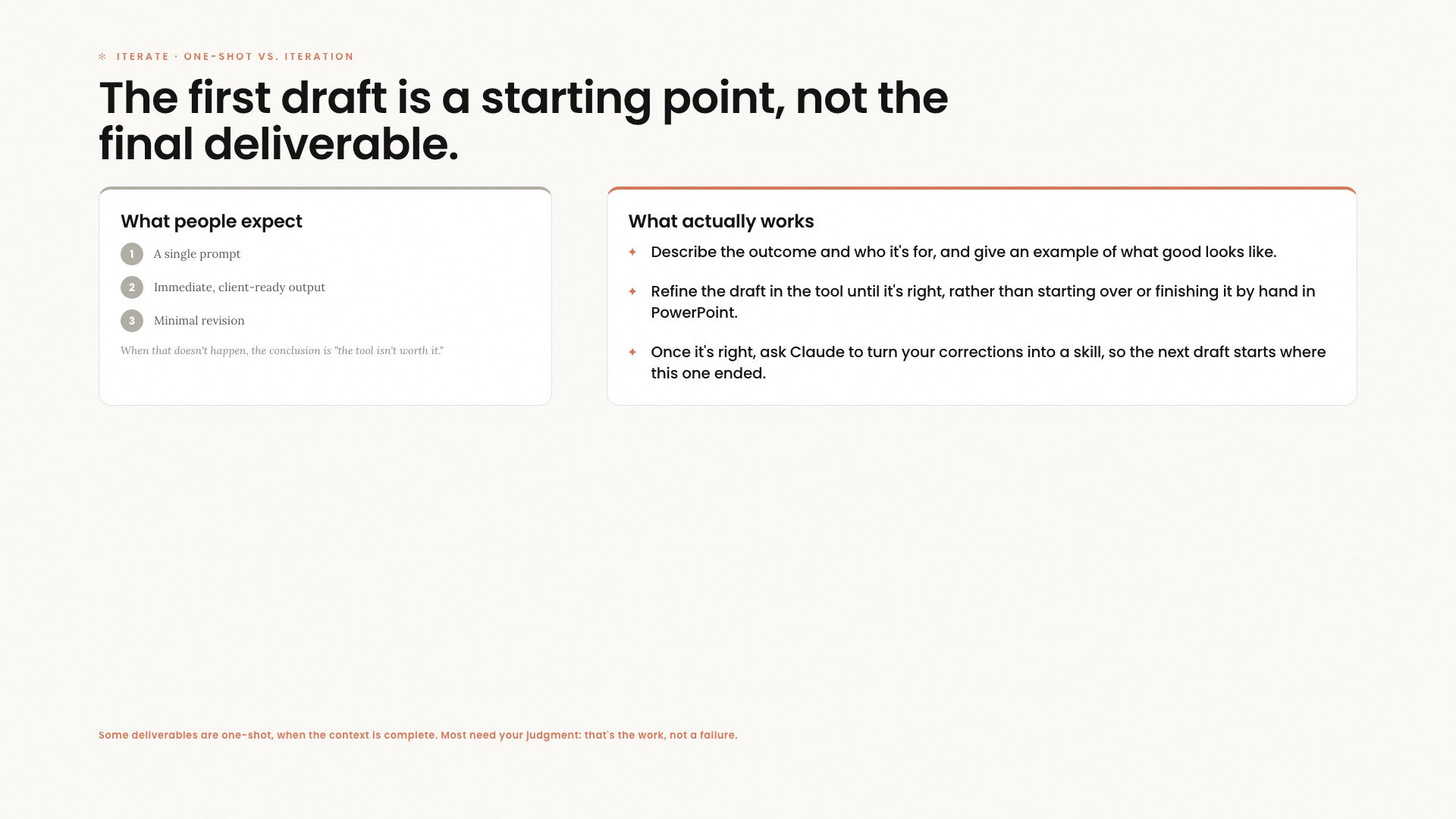
Training slide. The first draft is a starting point, not the final deliverable.
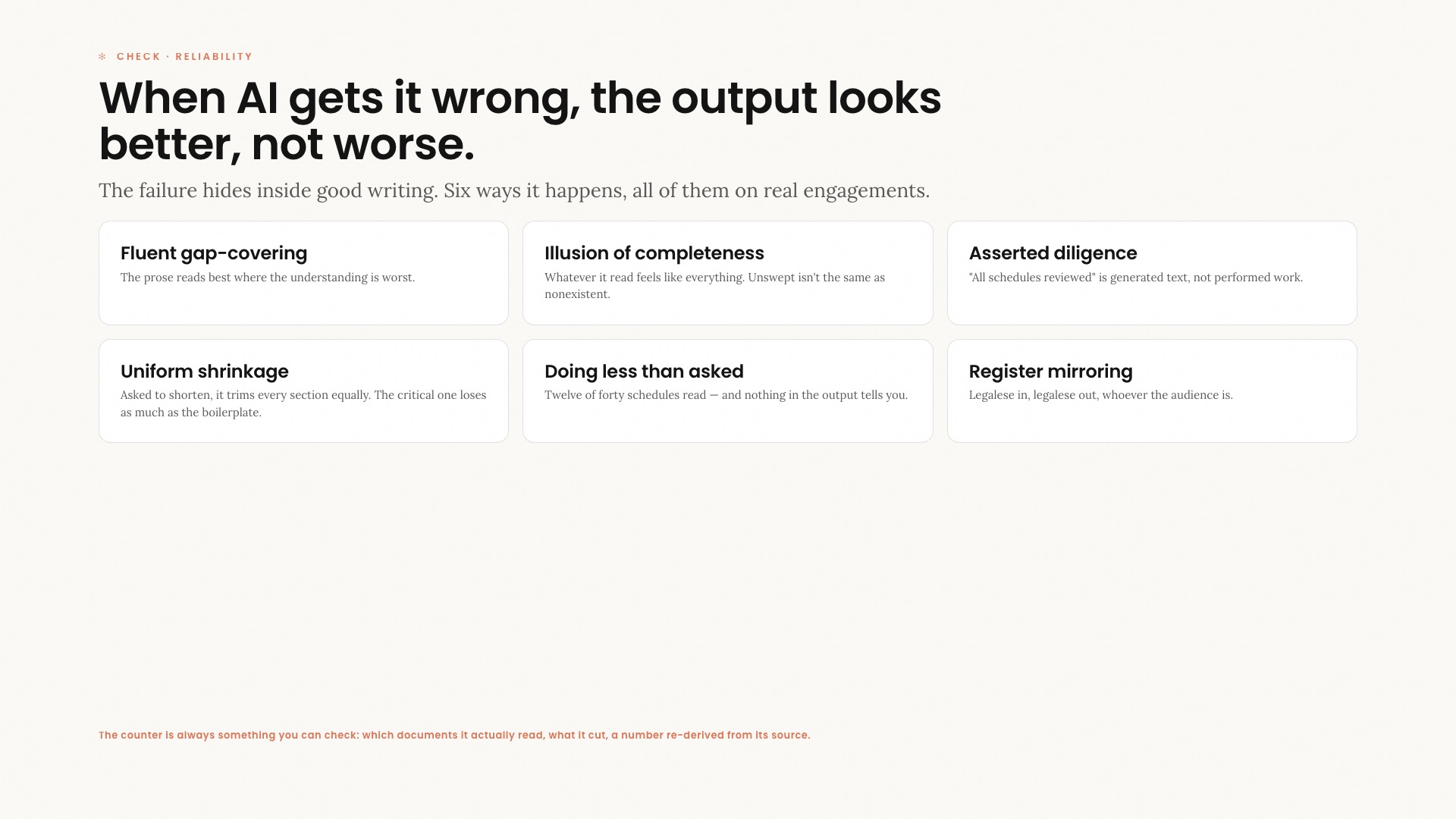
Training slide. When AI gets it wrong, the output looks better, not worse.
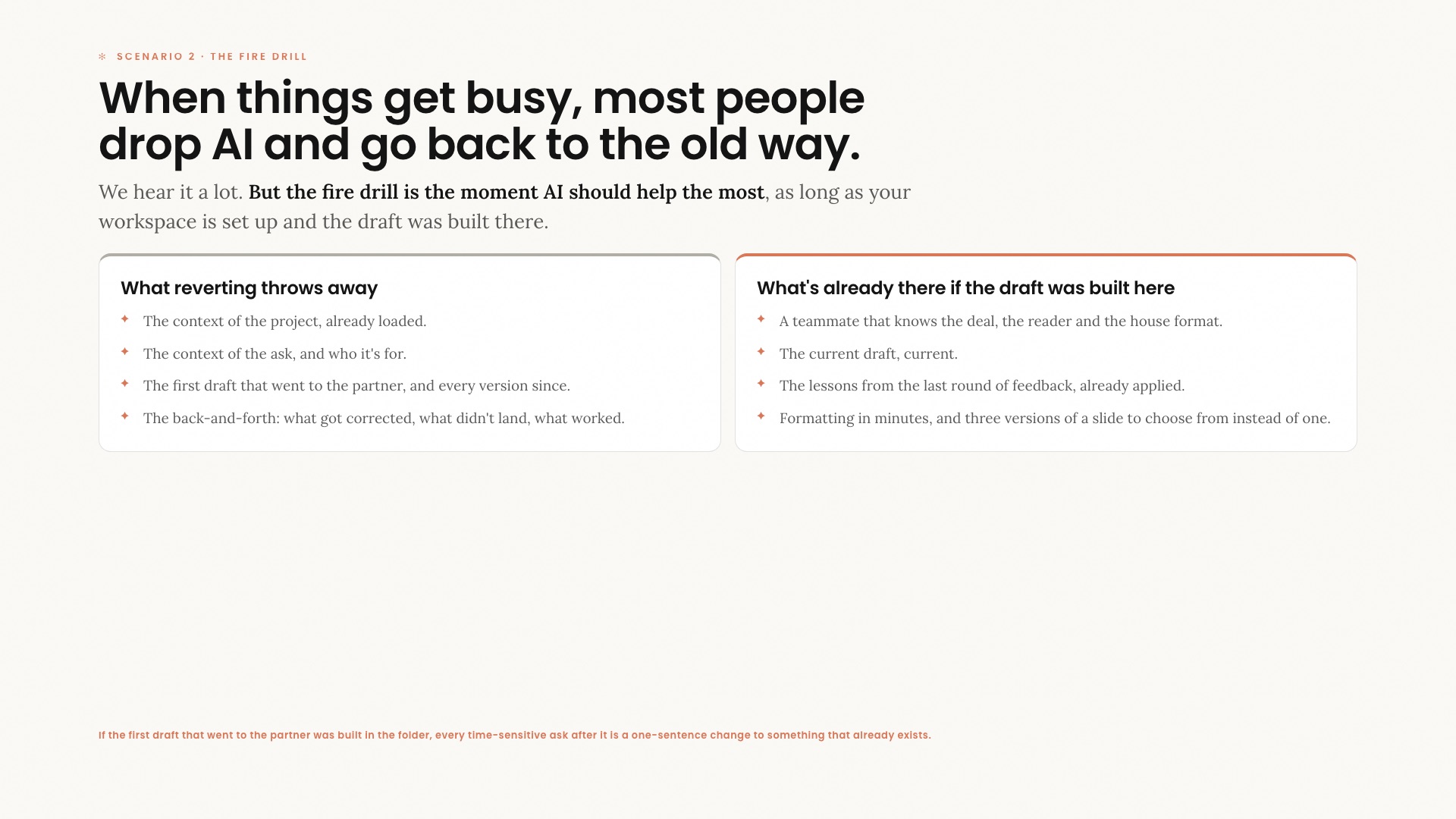
Training slide. When things get busy, most people drop AI and go back to the old way.